
Skip to content

Headless email API for magic link and OTP

Implement email OTP or magic link using direct API calls with full control over UX

This guide shows you how to implement magic link and OTP authentication using Scalekit’s headless APIs. You send either a one-time passcode (OTP) or a magic link to the user’s email and then verify their identity. Magic link and OTP offer two email-based authentication methods—clickable links or one-time passcodes—so users can sign in without passwords. You control the UI and user flows, while Scalekit provides the backend authentication infrastructure.

See the integration in action Play
Review the authentication sequence

Coming soon

Get moving, instantly, with your go-to AI assistant

Input this prompt in your IDE to analyze your existing code base and generate magic link and OTP implementation code accordingly.

*Compatible with Cursor, Windsurf, VS Code, and any AI-powered tools
Copy llm prompt

  1. Install the Scalekit SDK to your project.

    npm install @scalekit-sdk/node

    Your application is responsible for verifying users and initiating sessions, while Scalekit securely manages authentication tokens to ensure the verification process is completed successfully

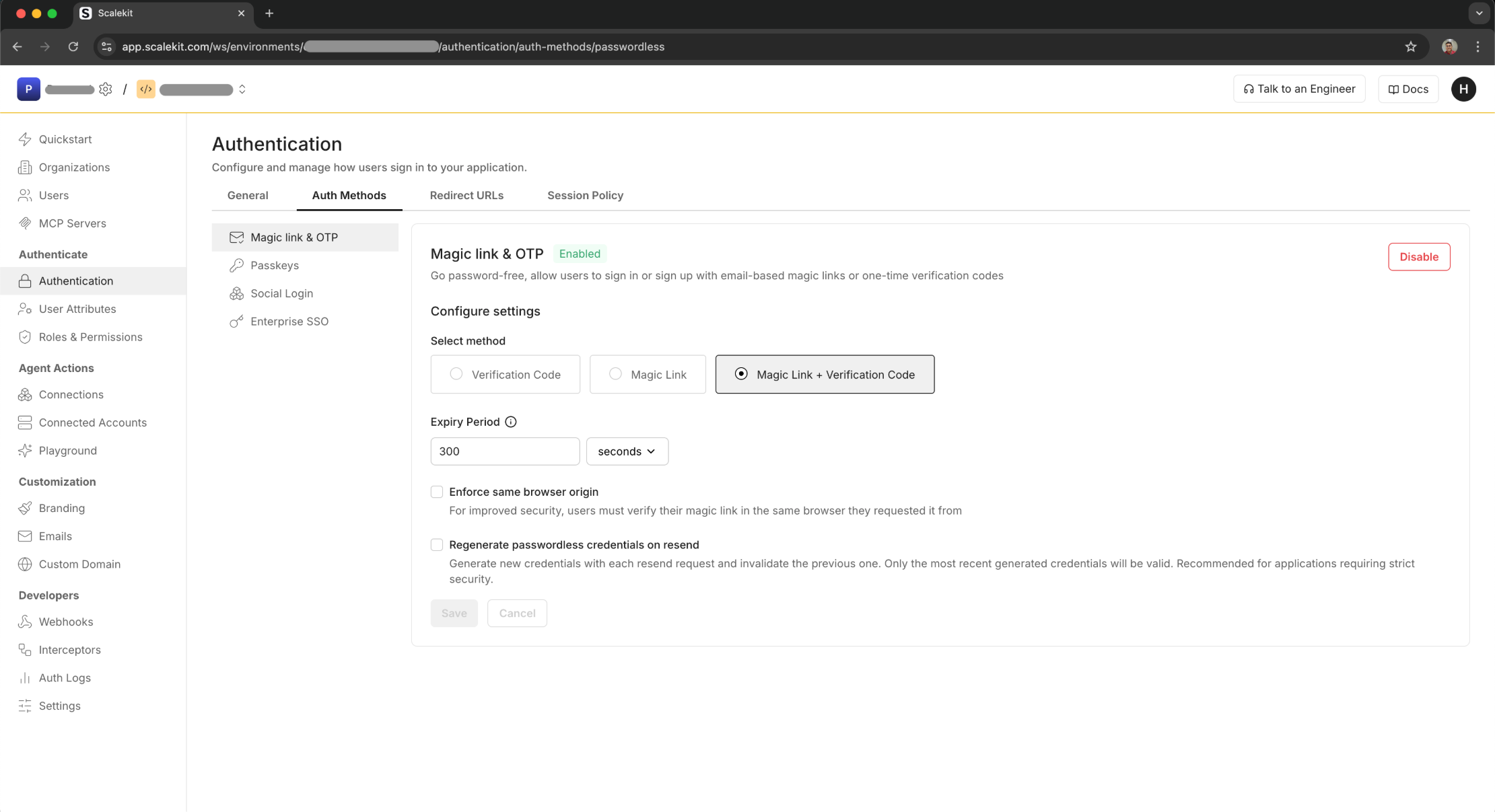
  2. In the Scalekit dashboard, enable magic link and OTP and choose your login method.

    Optional security settings:

    • Enforce same-browser origin: Users must complete magic-link auth in the same browser they started in.
    • Issue new credentials on resend: Each resend generates a fresh code or link and invalidates the previous one.

  3. The first step in the magic link and OTP flow is to send a verification email to the user’s email address. This email contains either a one-time passcode (OTP), a magic link, or both based on your selection in the Scalekit dashboard.

    Follow these steps to implement the verification email flow:

    1. Create a form to collect the user’s email address
    2. Call the passwordless API (magic link and OTP) when the form is submitted
    3. Handle the response to provide feedback to the user
    API endpoint
    POST /api/v1/passwordless/email/send

    Example implementation

    Send a verification code to user's email
    curl -L '<SCALEKIT_ENVIRONMENT_URL>/api/v1/passwordless/email/send' \
    -H 'Content-Type: application/json' \
    -H 'Authorization: Bearer eyJh..' \
    --data-raw '{
    "email": "john.doe@example.com",
    "expires_in": 300,
    "state": "jAy-state1-gM4fdZ...2nqm6Q",
    "template": "SIGNIN",
    "magiclink_auth_uri": "https://yourapp.com/passwordless/verify",
    "template_variables": {
    "custom_variable_key": "custom_variable_value"
    }
    }'
    # Response
    6 collapsed lines
    # {
    # "auth_request_id": "jAy-state1-gM4fdZ...2nqm6Q"
    # "expires_at": "1748696575"
    # "expires_in": 100
    # "passwordless_type": "OTP" | "LINK" | "LINK_OTP"
    # }
    Request parameters
    ParameterRequiredDescription
    emailYesRecipient’s email address string
    expires_inNoCode expiration time in seconds (default: 300) number
    stateNoOIDC state parameter for request validation string
    templateNoEmail template to use (SIGNIN or SIGNUP) string
    magiclink_auth_uriNoMagic Link URI that will be sent to your user to complete the authentication flow. If the URL is of the format https://yourapp.com/passwordless/verify, the magic link sent to your user via email will be https://yourapp.com/passwordless/verify?link_token=<link_token>. Required if you selected Link or Link + OTP as your authentication method.string
    template_variablesNoPass variables to be used in the email template sent to the user. You may include up to 30 key-value pairs to reference in the email template. object
    Response parameters
    ParametersDescription
    auth_request_idA unique identifier for the authentication request that can be used to verify the code string
    expires_atUnix timestamp indicating when the verification code will expire string
    expires_inThe time in seconds after which the verification code will expire. Default is 100 seconds number
    passwordless_typeThe type of magic link and OTP authentication. Currently supports OTP, LINK and LINK_OTP string
  4. Users can request a new verification email if they need one. Use the following endpoint to resend an OTP or magic link email.

    Request
    curl -L '<SCALEKIT_ENVIRONMENT_URL>/api/v1/passwordless/email/resend' \
    -H 'Content-Type: application/json' \
    -H 'Authorization: Bearer eyJhbGciOiJSUzI1NiIsIm..' \
    -d '{
    "auth_request_id": "jAy-state1-gM4fdZ...2nqm6Q"
    }'
    # Response
    # {
    # "auth_request_id": "jAy-state1-gM4fdZ...2nqm6Q"
    # "expires_at": "1748696575"
    # "expires_in": 300
    # "passwordless_type": "OTP" | "LINK" | "LINK_OTP"
    # }
    Request parameters
    ParametersRequiredDescription
    auth_request_idYesThe unique identifier for the authentication request that was sent earlier string
    Response parameters
    ParametersDescription
    auth_request_idA unique identifier for the authentication request that can be used to verify the code string
    expires_atUnix timestamp indicating when the verification code will expire string
    expires_inThe time in seconds after which the verification code will expire. Default is 300 seconds number
    passwordless_typeThe type of magic link and OTP authentication. Currently supports OTP, LINK and LINK_OTP string

    If you enabled Enable new Magic link & OTP credentials on resend in the Scalekit dashboard, a new verification code or magic link will be sent each time the user requests a new one.

  5. Once the user receives the verification email,

    • If it is a verification code, they’ll enter it in your application. Use the following endpoint to validate the code and complete authentication.
    • If it is a magic link, they’ll click the link in the email to verify their address. Capture the link_token query parameter and use it to verify.
    • For additional security with magic links, if you enabled “Enforce same browser origin” in the dashboard, include the auth_request_id in the verification request.
    1. Create a form to collect the verification code
    2. Call the verification API when the form is submitted to verify the code
    3. Handle the response to either grant access or show an error
    API endpoint
    POST /api/v1/passwordless/email/verify

    Example implementation

    Request
    curl -L '<SCALEKIT_ENVIRONMENT_URL>/api/v1/passwordless/email/verify' \
    -H 'Content-Type: application/json' \
    -H 'Authorization: Bearer eyJhbGciOiJSUzI1NiIsIm..' \
    -d '{
    "code": "123456",
    "auth_request_id": "YC4QR-dVZVtNNVHcHwrnHNDV..."
    }'
    Request parameters
    ParametersRequiredDescription
    codeYesThe verification code entered by the user string
    auth_request_idYesThe request ID from the response when the verification email was sent string
    Response parameters
    ParametersDescription
    emailThe email address of the user string
    stateThe state parameter that was passed in the original request string
    templateThe template that was used for the verification code string
    passwordless_typeThe type of magic link and OTP authentication. Currently supports OTP, LINK and LINK_OTP string

You’ve successfully implemented Magic link & OTP authentication in your application. Users can now sign in securely without passwords by entering a verification code (OTP) or clicking a magic link sent to their email.